
Cactus Warrant Checks
For any Cactus citation, two routes reach the court. Call the municipal court clerk at 806-966-5458, or use the city-linked nCourt payment screen with your citation or case number in hand. The court sits at 201 S. Highway 287. Before you pay a dime or walk into City Hall, ask the clerk whether your file is in FTA or capias status. Cactus publishes no active-warrant list and no name-only search on its public pages. A payment lookup can find a ticket, but it cannot tell you whether a warrant was issued, served, or recalled.
- Read the court and citation number from the ticket.
- Call the clerk about current warrant or capias status.
- Ask which payment or hearing path applies to that status.
- Save the receipt and confirm any recall in the court record.
Cactus Warrant Screen Takes Citation or Case Number
The city-linked nCourt form gives you two choices: Citation/Ticket Number or Case/Cause Number. The next field is labeled Enter Citation/Case Number. There is no name search. It works by identifier only. The form's controls help locate eligible payment records, nothing more, and the official city payment route it links to shows no warrant results or list of Cactus cases.
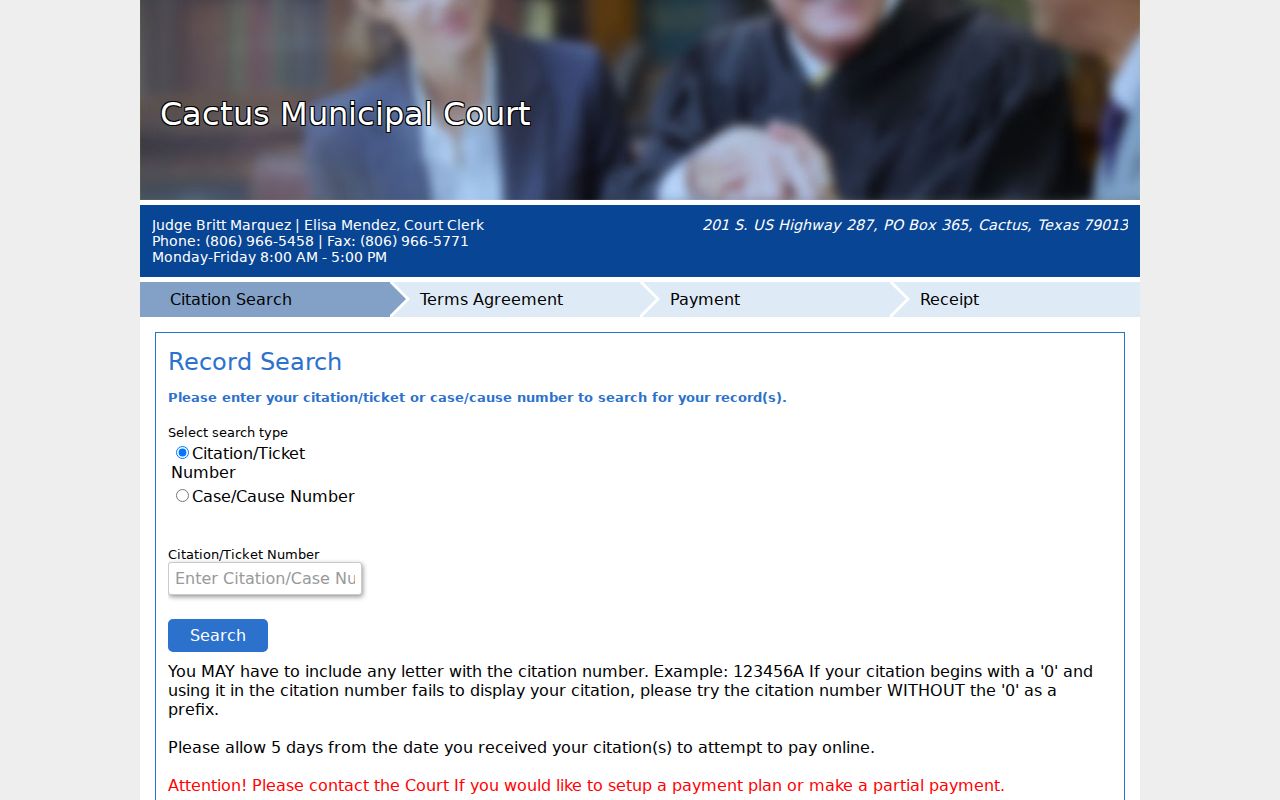
If your identifier comes up empty, call the Cactus clerk. Do not try someone else's details instead.
Policing and Courts in Cactus
Cactus Police lists its physical address as 199 S. Highway 287, with a mailing address of P.O. Box 365, phone 806-966-5319, and fax 806-966-3386. The municipal court uses 201 S. Highway 287 and lists 806-966-5458. Two offices, two sets of records. City Hall also sits at 201 S. Highway 287 and publishes weekday hours from 8 a.m. to 5 p.m. The court directory names Court Clerk Elisa Mendez and Judge Britt Marquez, along with separate court fax information.
Call the Cactus municipal court about a citation or capias. Call police about a police-held record.
Cactus Warrant Tickets May Take Five Days
The portal warns that a citation may take five days to appear. An empty result inside that window can simply mean Cactus has not posted the ticket to the payment interface yet. It does not prove that no case or capias exists. Keep your paper citation. If a due date or a missed appearance is close, call the court at 806-966-5458 and ask for its current record rather than waiting on a vendor screen.
Warrants in Cactus: The Main Types
A city citation in Cactus usually involves traffic or an ordinance matter. Miss a court appearance or leave a judgment unpaid, and the court may start a process, though an open case is not automatically a warrant. Felony matters and county justice tickets follow a different court route entirely.
| Question | Cactus route | Limit |
|---|---|---|
| City citation | Municipal Court | Payment screen is not a warrant search |
| Police report | Cactus Police | Separate from the court docket |
| County ticket | Issuing JP | Do not assume Cactus holds it |
| Felony matter | District Court route | Different clerk and process |
Use the court named on your document, not just the city where the event occurred.
Cactus Warrant Records Sit With Separate Offices
A police request covers incident reports and agency files. A Cactus municipal court request covers citations, cases, payments, capias filings, and recalls. The Cactus website links both offices but never merges them into one warrant system. If the court says a matter went out for service, ask which agency received it. If police cannot find a court process, ask for the issuing court and the cause number.
Cactus Warrant Record: What It Shows
A municipal court file can tie a citation to a cause number, offense, hearing date, fine, FTA entry, capias, payment, or recall. Cactus publishes no sample warrant record and no active roster. Ask the clerk which entries are current.
| Citation / ticket number | Identifier printed on the city citation. |
|---|---|
| Case / cause number | Number entered by the court if assigned. |
| FTA or capias | Separate status entry that the clerk should confirm. |
| Payment | Portal transaction, not necessarily a recall order. |
| Disposition | Later court event, if entered and releasable. |
Match the number and the date. A similar name alone is not a record match in Cactus.
Confirm the Cactus Warrant Mailing ZIP
Official Cactus pages disagree on the ZIP code. City Hall and police material use 79013 in some places, while the municipal-court directory shows 79103. Call the clerk and confirm before you mail anything time-sensitive. A returned letter can stall a warrant request or payment for weeks. The phone route settles the destination fast.
Where Cactus Warrants Fit With Moore County
A Cactus municipal citation belongs with the Cactus court first. Cactus Police may handle local service, while the Moore County Sheriff at 700 S. Bliss Ave. is a separate county route. For the county court map and sheriff contacts, visit the Moore County warrant records home. Paying a city ticket cannot clear a separate JP or district warrant. The sensible flow runs from Cactus Municipal Court to city police for local process, then to the county sheriff only when the issuing court or agency points you there.
Cactus Warrant Case Activity Is Not a Count
The Office of Court Administration tracks Cactus municipal criminal case openings, reactivations, dispositions, inactive matters, and pending cases. Those figures describe case activity over a reporting period. They do not count warrants. They cannot tell you whether a particular ticket carries a capias. Ask the Cactus court about your citation, and never read an aggregate pending total as a count of people or active warrants.
Public Access to Cactus Warrant Records
Texas public-information law opens most government records to anyone who asks, though a few exceptions and court-access limits still apply. A warrant search in Cactus starts with a simple question: which office holds the paper you need? A citation may sit with the municipal court, a police record with the police department, and a capias or recall entry on the court's docket. No Cactus office publishes a warrant-specific request form or fee schedule, so ask the city for its current records contact before you mail anything. Put your request in writing and keep it narrow: cite the case or citation number, the rough date, and the type of record you want. The city can then give you a fee estimate for the warrant lookup.
Cactus Payment Fee Does Not Recall a Warrant
Cactus uses nCourt for payments, and its instructions carry two warnings. Pay in full within 30 days and a $25 time-payment fee applies. Pay only part, or set up a plan, and you must contact the court first. Nothing in either instruction promises that payment alone recalls a warrant the court has already issued, so confirm with the Cactus court that any outstanding warrant is actually withdrawn.
Before paying a ticket that may be in capias status, ask the clerk which action will resolve the court's process.
Keep your Cactus payment receipt, then ask the court for docket confirmation that the warrant was recalled.